
Featured Apps
MediaHub
Top News
Stocktracker
Startup Remix
Roblox Robux Calculator
Free Apps (TOP)
Free Apps (NEW)
Paid Apps (TOP)
Paid Apps (NEW)
Top Grossing Apps
Jobsearch Apps
News Apps
Business Apps
Finance Apps
HTML Open Tag Checker
Marketing URL Builder
Percentage Calculator
Inflation Calculator
Loan Interest Calculator
Kids Apps
Dating Apps
Senior Apps
Tradesman Apps
Board Game Apps
Faith Apps
Meditation Apps
AI Apps
EV Apps
Feature Your App
Casting ATL App
The Shop Channel App



iDesign App
Price: $ 0 USD - Free
Genre: Productivity
Developer: TouchAware Limited Developer: TouchAware Limited
Seller: TouchAware Limited Seller: TouchAware Limited
Rated: 2.59 out of 5 stars.
Based on 87 reviews.
Shop Collectibles and Memorabilia.
Price: $ 0 USD - Free
Genre: Productivity
Developer: TouchAware Limited Developer: TouchAware Limited
Seller: TouchAware Limited Seller: TouchAware Limited
Rated: 2.59 out of 5 stars.
Based on 87 reviews.
Shop Collectibles and Memorabilia.
Apple AppStore - Google Play
iDesign App V. 4.4.2
by TouchAware Limited
Precision 2D vector drawing and design on the iPad & iPhone. Make professional quality designs, illustrations and technical drawings on the move using your fingers at last! iDesign has unique feature - More Info...

New Music Discovery with PlaylistDuel.com
AMAZON EBAY WALMART
BESTBUY ETSY
Huge Collectibles - Preorders Bestseller Gifts Shop Disney Collectibles
Top Gifts and Preorders Entertainment Earth SideShow Collectibles
❯ Top Gifts and Preorders.
❯ The iDesign App Review from the BigTopApps Team.
🌟 What makes iDesign so special? 🌟
Precision 2D vector drawing and design on the iPad & iPhone. Make professional quality designs, illustrations and technical drawings on the move using your fingers at last! iDesign has unique features and offset controls which allows you to draw accurately with your finger not getting in the way or blocking your view. Full feature compatibility a...
Whether you're a seasoned pro or a newbie in the digital world, iDesign app is designed to make your life easier, more fun, and more productive. Here are just a few highlights:
share
🚀 Price: 0 USD
📈 Rating: 2.59 out of 5 stars. Based on 87 total reviews.
🎨 Content Rating: 4+
💡 New Features:
- Fixed import of SVG files created in Visio.
- Updated legacy user support for iOS/iPadOS
But that's not all! The TouchAware Limited team is continuously improving and expanding iDesign to bring you even more exciting features at the palm of your hand, being last updated at 2026-10-17, the TouchAware Limited team works hard to stay ahead of the curve and bring you an exceptionally robust, secure, and up-to-date app.
Download and experience iDesign now and unlock a new journey in your mobile world – Your mobile device will thank you.! 📱💫
Also don't miss out on future mobile app features. Join the millions who have already discovered the magic of iDesign and download BigTopApps Discovery App today, and never miss a new app announcement and feature release again! We are also on the web at BigTopApps.com.
Apple AppStore - Google Play
Shop Collectibles and Memorabilia.
BestBuy - WalMart - Entertainment Earth
iDesign App Details
Available Since: 2010-04-23
Developer: TouchAware Limited
Seller: TouchAware Limited
Price: 0 USD
Current version: 4.4.2
Last Updated: 2026-10-17
Ratings: 2.59 out of 5 stars.
Based on 87 reviews. (Rate/Review)
Genre: Productivity
Filesize: 86.08MB
IOS Bundle ID: com.touchaware.idesign
Age Rating: 4+
Languages: EN, FR, DE, IT, JA, ZH, ES, CY
Videos: iDesign App Videos
Developer: TouchAware Limited
Seller: TouchAware Limited
Price: 0 USD
Current version: 4.4.2
Last Updated: 2026-10-17
Ratings: 2.59 out of 5 stars.
Based on 87 reviews. (Rate/Review)
Genre: Productivity
Filesize: 86.08MB
IOS Bundle ID: com.touchaware.idesign
Age Rating: 4+
Languages: EN, FR, DE, IT, JA, ZH, ES, CY
Videos: iDesign App Videos
Apple AppStore - Google Play
iDesign Updates and Release Notes
- Fixed import of SVG files created in Visio.
- Updated legacy user support for iOS/iPadOS version 15 to 17.
- Updated legacy user support for iOS/iPadOS version 15 to 17.
Please note BigTopApps is not responsible for the content provided by the publicly accessible App Store API.
❯ iDesign App Description
Precision 2D vector drawing and design on the iPad & iPhone.
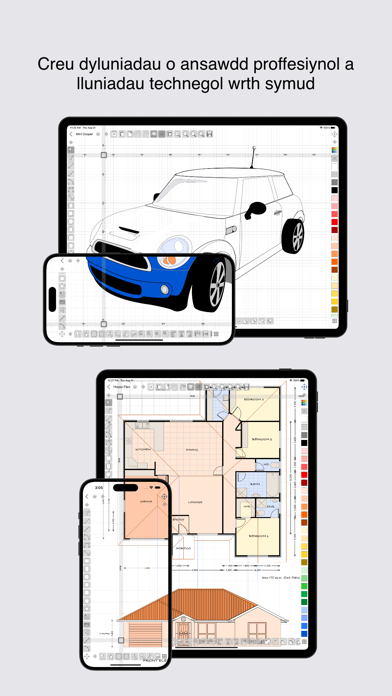
Make professional quality designs, illustrations and technical drawings on the move using your fingers at last! iDesign has unique features and offset controls which allows you to draw accurately with your finger not getting in the way or blocking your view.
Full feature compatibility and automatic sync of designs via iCloud with XDesign (Mac version).
User Guide (PDF) available at www.touchaware.com/apps/idesign/userguide
FEATURES
- A universal app for both iPad and iPhone which adapts to the native screen size of the device.
- An unobtrusive icon based visual and context driven user interface with a full screen board view
- Toolbars and panels with easy access to frequently used functions for a fast work flow
Standard Tools & Functions
- Line, polyline, square, rectangle, circle, arc, ellipse, polygons, stars & path tools
- Copy and paste selected shapes and groups
- Group and ungroup shapes hierarchically to create complex designs
- Edit points, convert shapes to path, close shapes, add and remove points, break, weld, explode and join
- Precise rotation with ability to rotate at user defined center
- Object alignment tools
- Fill color and pen color swatches with opacity controls, custom RGB mixer
- Stroke width, line style, line caps and corner join styles, arrow ends and dash patters
- Text insertion with fonts, styles, sizes, paragraph alignments, multilingual, rotate/resize
- Set a background image for tracing/marking over it
- Insert images, copy, paste, move, resize and position them accordingly
- Multilevel Undo/Redo for all edit operations
- Create multiple layers to organize & separate design components
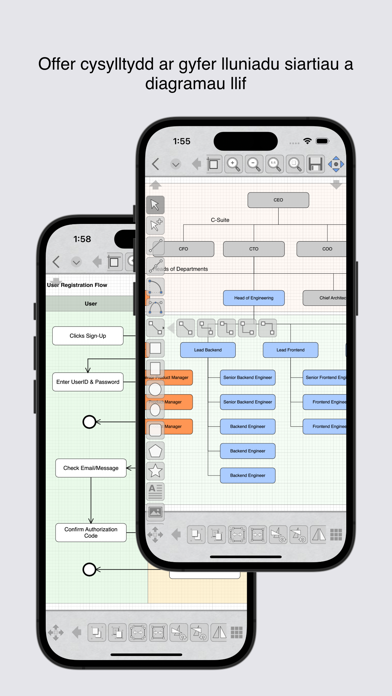
- Connector tools for drawing charts and flow diagrams
Unique Features for Touch Based Editing
- Offset handles for moving and positioning without your finger blocking the view
- Nudge controls, allows precise movement of selected shapes or selected points
- Delta transformations to apply incremental values by keyboard
Advanced Tools for Graphics Design
- Advanced path editing options for corner, smooth and symmetric control points, straighten and curve segments
- Text to path conversion
- Boolean operations on shapes, unite, intersect, subtract, exclude
- Freehand drawing, auto smoothened paths
- Gradients / color blends
Advanced Tools for Technical Drawing
- Circle and Arc tool based on center, start/end point, radius and angle of arc
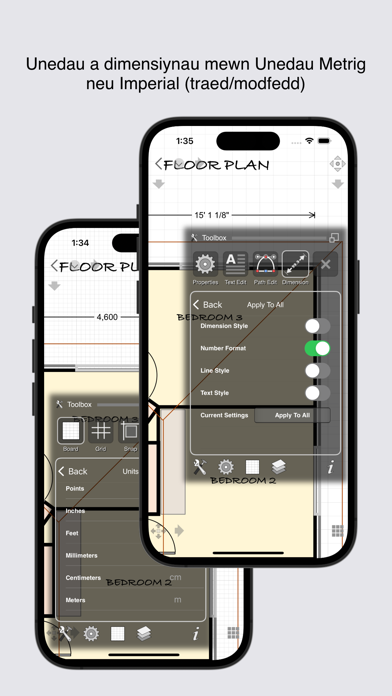
- Dimensioning tools, length as well as angular with customisable settings
- Support for Feet+Inches+Fractions (U.S & older unit system) - Architectural formatting option for Dimensions - Dynamic grid supporting feet, inches and inch fractions at different zoom levels
Units & Board Setup
- Support for standard and custom board sizes.
- Set a drawing scale
- Full set of standard unit systems.
- Unit aware Grid with customisable settings
- Snap to grid, snap to object and points
- Unit aware rulers
Shape libraries to organise and reuse shapes
- Add, remove and organise shapes in your own libraries
- A set of standard shapes for creating floor plans included
Export/Import & Print
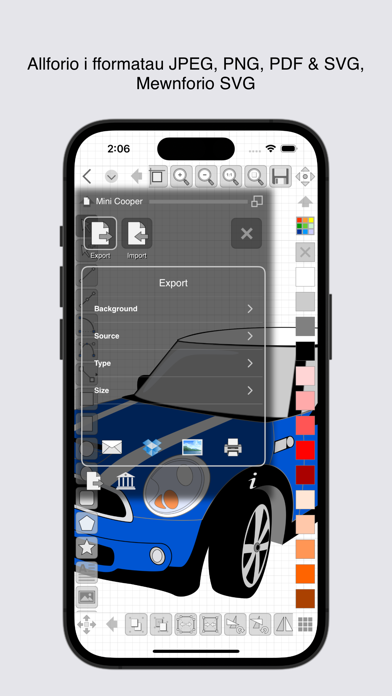
- Export designs to JPEG, PNG, PDF & SVG formats
- Import SVG files
- Share your designs with other iDesign users via Email
- Dropbox support for Export, Import
- AirPrint Support
iDesign is available as a monthly or yearly subscription and includes a free trial period that begins once your purchase has been confirmed with your Apple ID account. At the end of the trial your subscription will start and renew automatically. Your Apple ID account will be charged for the upcoming period unless you disable auto-renew or cancel your subscription in your Account Settings at least 24-hours prior to the end of the current period.
Terms of Use: http://www.touchaware.com/apps/termsofuse
Privacy policy: http://www.touchaware.com/apps/privacy
Make professional quality designs, illustrations and technical drawings on the move using your fingers at last! iDesign has unique features and offset controls which allows you to draw accurately with your finger not getting in the way or blocking your view.
Full feature compatibility and automatic sync of designs via iCloud with XDesign (Mac version).
User Guide (PDF) available at www.touchaware.com/apps/idesign/userguide
FEATURES
- A universal app for both iPad and iPhone which adapts to the native screen size of the device.
- An unobtrusive icon based visual and context driven user interface with a full screen board view
- Toolbars and panels with easy access to frequently used functions for a fast work flow
Standard Tools & Functions
- Line, polyline, square, rectangle, circle, arc, ellipse, polygons, stars & path tools
- Copy and paste selected shapes and groups
- Group and ungroup shapes hierarchically to create complex designs
- Edit points, convert shapes to path, close shapes, add and remove points, break, weld, explode and join
- Precise rotation with ability to rotate at user defined center
- Object alignment tools
- Fill color and pen color swatches with opacity controls, custom RGB mixer
- Stroke width, line style, line caps and corner join styles, arrow ends and dash patters
- Text insertion with fonts, styles, sizes, paragraph alignments, multilingual, rotate/resize
- Set a background image for tracing/marking over it
- Insert images, copy, paste, move, resize and position them accordingly
- Multilevel Undo/Redo for all edit operations
- Create multiple layers to organize & separate design components
- Connector tools for drawing charts and flow diagrams
Unique Features for Touch Based Editing
- Offset handles for moving and positioning without your finger blocking the view
- Nudge controls, allows precise movement of selected shapes or selected points
- Delta transformations to apply incremental values by keyboard
Advanced Tools for Graphics Design
- Advanced path editing options for corner, smooth and symmetric control points, straighten and curve segments
- Text to path conversion
- Boolean operations on shapes, unite, intersect, subtract, exclude
- Freehand drawing, auto smoothened paths
- Gradients / color blends
Advanced Tools for Technical Drawing
- Circle and Arc tool based on center, start/end point, radius and angle of arc
- Dimensioning tools, length as well as angular with customisable settings
- Support for Feet+Inches+Fractions (U.S & older unit system) - Architectural formatting option for Dimensions - Dynamic grid supporting feet, inches and inch fractions at different zoom levels
Units & Board Setup
- Support for standard and custom board sizes.
- Set a drawing scale
- Full set of standard unit systems.
- Unit aware Grid with customisable settings
- Snap to grid, snap to object and points
- Unit aware rulers
Shape libraries to organise and reuse shapes
- Add, remove and organise shapes in your own libraries
- A set of standard shapes for creating floor plans included
Export/Import & Print
- Export designs to JPEG, PNG, PDF & SVG formats
- Import SVG files
- Share your designs with other iDesign users via Email
- Dropbox support for Export, Import
- AirPrint Support
iDesign is available as a monthly or yearly subscription and includes a free trial period that begins once your purchase has been confirmed with your Apple ID account. At the end of the trial your subscription will start and renew automatically. Your Apple ID account will be charged for the upcoming period unless you disable auto-renew or cancel your subscription in your Account Settings at least 24-hours prior to the end of the current period.
Terms of Use: http://www.touchaware.com/apps/termsofuse
Privacy policy: http://www.touchaware.com/apps/privacy
Apple AppStore - Google Play
Discussions, Ratings, and Reviews for iDesign App
Leave feedback and review iDesign
Featured Apps
MediaHub
Top News
Stocktracker
Startup Remix
Roblox Robux Calculator
Free Apps (TOP)
Free Apps (NEW)
Paid Apps (TOP)
Paid Apps (NEW)
Top Grossing Apps
Jobsearch Apps
News Apps
Business Apps
Finance Apps
HTML Open Tag Checker
Marketing URL Builder
Percentage Calculator
Inflation Calculator
Loan Interest Calculator
Kids Apps
Dating Apps
Senior Apps
Tradesman Apps
Board Game Apps
Faith Apps
Meditation Apps
AI Apps
EV Apps
Feature Your App
Casting ATL App
The Shop Channel App
Featured: Shop Apple iPhone
Top Free Apps

TikTok Pro - Events - TikTok Ltd.
1
TikTok Pro - Events is a global discovery platform for videos where you can discover cool, funny, and educational short videos, as well as share important moments with your friends.
Enga...

Muse from Meta - Meta Platforms, Inc.
2
Muse is your personal AI agent that gets things done, always working on what matters to you. It manages email, books dinners, tracks budgets, and finds deals, with your approval.
PERSONA...

Vinted: Pre-loved marketplace - Vinted Limited
3
The idea is simple: you sell your pre-loved stuff to other members who’ll love it again. They get the thrill of unboxing a great find, you get more space at home. It's look-good, do-good,...

ChatGPT - OpenAI OpCo, LLC
4
Introducing ChatGPT for iOS: OpenAI’s latest advancements at your fingertips.
This official app is free, syncs your history across devices, and brings you the latest from OpenAI, includi...

GoWish - Your Digital Wishlist - Onskeskyen ApS
5
What can GoWish be used for?
GoWish is your digital wishlist, where you can create and save all your wishes in one place. Download the GoWish app, create a profile, and add wishes that yo...

PineDrama - Short Dramas - TikTok Ltd.
6
Welcome to PineDrama - Short Dramas – TikTok's Official Short Drama App!
Dive into a premium streaming experience tailored for your fast-paced lifestyle. PineDrama - Short Dramas brings ...
Top Paid Apps

Minecraft: Play with Friends! - Mojang
1
Dive into an open world of building, crafting and survival. Gather resources, survive the night, and build whatever you can imagine one block at a time. Explore and craft your way through...

Heads Up! - Warner Bros.
2
It's the game The New York Times called a "Sensation!" and Cosmopolitan raved “Your existence is dull and meaningless without this life-changing app!”
Get ready for endless fun with Head...

Shadowrocket - Shadow Launch Technology Limited
3
Rule based proxy utility client for iPhone/iPad.
- Capture all HTTP/HTTPS/TCP traffic from any applications on your device, and redirect to the proxy server.
- Record and display HTTP, H...

Geometry Dash - RobTop Games AB
4
Jump and fly your way through danger in this rhythm-based action platformer!
"Frustratingly wonderful" - Kotaku
"Geometry Dash provides all of the challenge expected from an “impossibl...

Plague Inc. - Ndemic Creations
5
Can you infect the world? Plague Inc. is a unique mix of high strategy and terrifyingly realistic simulation.
Your pathogen has just infected 'Patient Zero'. Now you must bring about th...

HotSchedules - HotSchedules
6
HotSchedules is the industry's leading employee scheduling app because it’s the fastest and easiest way to manage your schedule and communicate with your team.
Team members love it bec...
Top Grossing Apps
ChatGPT - OpenAI OpCo, LLC
1
Introducing ChatGPT for iOS: OpenAI’s latest advancements at your fingertips.
This official app is free, syncs your history across devices, and brings you the latest from OpenAI, includi...

YouTube - Google
2
Get the official YouTube app on iPhones and iPads. See what the world is watching -- from the hottest music videos to what’s popular in gaming, fashion, beauty, news, learning and more. S...

TikTok - Videos, Shop & LIVE - TikTok Ltd.
3
TikTok is the global discovery platform for videos, streaming on LIVE, shopping, and more. Our mission is to inspire creativity and bring joy. Over a billion people come to TikTok to shar...

Pokémon GO - Scopely Explore, Inc.
4
Join Trainers across the globe who are discovering Pokémon as they explore the world around them. Pokémon GO is the global gaming sensation that has been downloaded over 1 billion times a...

Snapchat - Snap, Inc.
5
Snapchat is a fast and fun way to share the moment with your friends and family
SNAP
• Snapchat opens right to the Camera — just tap to take a photo, or press and hold for video.
• Expr...

Paramount+ - CBS Interactive
6
Stream exclusive originals, blockbuster movies, live sports like NFL on CBS, UFC, and UEFA Champions League, all of SHOWTIME® (Premium plan only), and favorites from CBS, BET, Nickelodeon...
New Free Applications


BIGTOPAPPS
 BigTopApps in the AppStore.
 BigTopApps in Google Play.
Contact US for Reviews.
THESHOPCHANNEL APP - Best Shopping Deals, Coupons, and Savings!
Phonetics Trainer on iOS and Android.
Mini Games Studio on iOS and Android.
Casting ATL, FREE on iOS and Google Play Store!
Apple TV MLS Season Pass Apple TV + Apple Music Free 3 Months
New Paid Applications


© 2026 BigTopApps -
Privacy Policy - Troubleshooting Guide - Directory - Contact Us
LiveDataLink Development.
Please note BigTopApps is not responsible for the content provided by the publicly accessible App Store API.
The BigTopApps, BigTopApps.com, and all connected websites, social media platforms, and media outlets are part of a professional website network.
Please note that we may receive compensation from various entities whose products and services we review, promote, and/or endorse.
We are independently owned and the opinions expressed here are our own, except where indicated.