
Featured Apps
MediaHub
Top News
Stocktracker
Startup Remix
Roblox Robux Calculator
Free Apps (TOP)
Free Apps (NEW)
Paid Apps (TOP)
Paid Apps (NEW)
Top Grossing Apps
Jobsearch Apps
News Apps
Business Apps
Finance Apps
HTML Open Tag Checker
Marketing URL Builder
Percentage Calculator
Inflation Calculator
Loan Interest Calculator
Kids Apps
Dating Apps
Senior Apps
Tradesman Apps
Board Game Apps
Faith Apps
Meditation Apps
AI Apps
EV Apps
Feature Your App
Casting ATL App
The Shop Channel App



CAD Pro - DWG Viewer & Editor App
Price: $ 0 USD - Free
Genre: Productivity
Developer: Syed Sahib Sultan Developer: Syed Sahib Sultan
Rated: 3 out of 5 stars.
Based on 2 reviews.
Shop Collectibles and Memorabilia.
Price: $ 0 USD - Free
Genre: Productivity
Developer: Syed Sahib Sultan Developer: Syed Sahib Sultan
Rated: 3 out of 5 stars.
Based on 2 reviews.
Shop Collectibles and Memorabilia.
Apple AppStore - Google Play
CAD Pro - DWG Viewer & Editor App V. 1.0.1
by Syed Sahib Sultan
CAD Pro - DWG Viewer & Editor is a powerful CAD drawing and 3D model app for iPhone and iPad. Open, view, edit, measure, annotate, convert, and export CAD files directly on your device. Whether you wo - More Info...

New Music Discovery with PlaylistDuel.com
AMAZON EBAY WALMART
BESTBUY ETSY
Huge Collectibles - Preorders Bestseller Gifts Shop Disney Collectibles
Top Gifts and Preorders Entertainment Earth SideShow Collectibles
❯ Top Gifts and Preorders.
❯ The CAD Pro - DWG Viewer & Editor App Review from the BigTopApps Team.
🌟 What makes CAD Pro - DWG Viewer & Editor so special? 🌟
CAD Pro - DWG Viewer & Editor is a powerful CAD drawing and 3D model app for iPhone and iPad. Open, view, edit, measure, annotate, convert, and export CAD files directly on your device. Whether you work with DWG drawings, DXF files, 3D models, BIM files, or technical PDFs, CAD Pro gives you professional tools without needing a desktop CAD applicati...
Whether you're a seasoned pro or a newbie in the digital world, CAD Pro - DWG Viewer & Editor app is designed to make your life easier, more fun, and more productive. Here are just a few highlights:


share
🚀 Price: 0 USD
📈 Rating: 3 out of 5 stars. Based on 2 total reviews.
🎨 Content Rating: 4+
💡 New Features:
Bug Fixes!
But that's not all! The Syed Sahib Sultan team is continuously improving and expanding CAD Pro - DWG Viewer & Editor to bring you even more exciting features at the palm of your hand, being last updated at 2026-09-08, the Syed Sahib Sultan team works hard to stay ahead of the curve and bring you an exceptionally robust, secure, and up-to-date app.
Download and experience CAD Pro - DWG Viewer & Editor now and unlock a new journey in your mobile world – Your mobile device will thank you.! 📱💫
Also don't miss out on future mobile app features. Join the millions who have already discovered the magic of CAD Pro - DWG Viewer & Editor and download BigTopApps Discovery App today, and never miss a new app announcement and feature release again! We are also on the web at BigTopApps.com.
Apple AppStore - Google Play
Shop Collectibles and Memorabilia.
BestBuy - WalMart - Entertainment Earth
CAD Pro - DWG Viewer & Editor App Details
Available Since: 2026-09-03
Developer: Syed Sahib Sultan
Seller: Syed Sahib Sultan
Price: 0 USD
Current version: 1.0.1
Last Updated: 2026-09-08
Ratings: 3 out of 5 stars.
Based on 2 reviews. (Rate/Review)
Genre: Productivity
Filesize: 37.48MB
IOS Bundle ID: com.sss.cadviewerEditor
Age Rating: 4+
Languages: AR, EN, FR, DE, IT, JA, KO, PT, RU, ZH, ES, ZH, TR
Videos: CAD Pro - DWG Viewer & Editor App Videos
Developer: Syed Sahib Sultan
Seller: Syed Sahib Sultan
Price: 0 USD
Current version: 1.0.1
Last Updated: 2026-09-08
Ratings: 3 out of 5 stars.
Based on 2 reviews. (Rate/Review)
Genre: Productivity
Filesize: 37.48MB
IOS Bundle ID: com.sss.cadviewerEditor
Age Rating: 4+
Languages: AR, EN, FR, DE, IT, JA, KO, PT, RU, ZH, ES, ZH, TR
Videos: CAD Pro - DWG Viewer & Editor App Videos
Apple AppStore - Google Play
CAD Pro - DWG Viewer & Editor Updates and Release Notes
Bug Fixes!
Please note BigTopApps is not responsible for the content provided by the publicly accessible App Store API.
❯ CAD Pro - DWG Viewer & Editor App Description
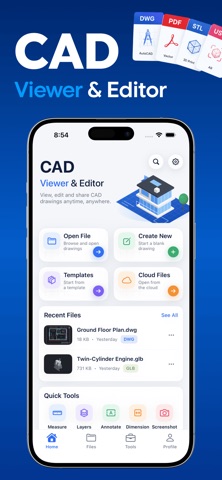
CAD Pro - DWG Viewer & Editor is a powerful CAD drawing and 3D model app for iPhone and iPad. Open, view, edit, measure, annotate, convert, and export CAD files directly on your device. Whether you work with DWG drawings, DXF files, 3D models, BIM files, or technical PDFs, CAD Pro gives you professional tools without needing a desktop CAD application.
Open DWG, DXF, DWT, DWS, DWF, DWFX, STEP, IGES, IFC, BREP, FreeCAD, ACIS, STL, OBJ, FBX, glTF, GLB, 3DS, DAE, PLY, OFF, 3MF, AMF, USD, USDZ, PDF, and more. View detailed CAD drawings and models with smooth pan, zoom, orbit, and navigation. Large drawings with 40,000+ objects are optimized for smooth performance using a Metal-accelerated canvas.
Edit 2D CAD drawings with professional drawing and modification tools. Create lines, polylines, rectangles, polygons, circles, arcs, ellipses, splines, points, freehand drawings, revision clouds, and hatches. Move, copy, rotate, scale, mirror, offset, trim, extend, fillet, chamfer, erase, and modify objects with precision.
Add annotations and technical dimensions including text, multiline text, leaders, labels, linear dimensions, aligned dimensions, radius, diameter, and angular dimensions. Use object snapping, orthographic mode, polar tracking, grid snapping, and typed coordinates for accurate CAD drafting.
Manage layers, blocks, layouts, paper space, external references, named views, and block attributes. Show, hide, lock, recolor, and adjust line weights and line types. Use grips editing, properties, undo and redo, keyboard shortcuts, text search, and drawing comparison to work faster.
Measure drawings with distance, running length, area, perimeter, angle, arc length, facade area, and point identification. Add measurement results directly to your CAD drawing as real dimensions.
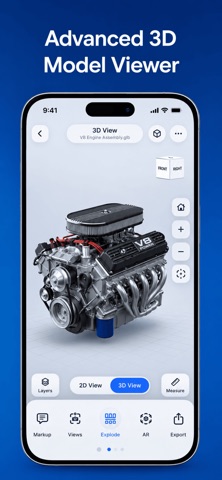
Explore 3D models with orbit, pan, zoom, view cube, preset views, shaded, wireframe, hidden line, realistic, x-ray, and shaded-with-edges rendering. Use section planes and section boxes, isolate or hide parts, explode assemblies, recolor components, and inspect model information such as file size, parts, and triangles. Measure 3D distances, angles, arcs, and circles. Save viewpoints, add 3D markup notes, and view USDZ models in augmented reality at real scale.
Convert between 2D and 3D workflows. Convert vector PDF drawings to DWG or DXF while preserving lines, polylines, arcs, hatches, text, layers, and paper size. Create 3D models from 2D CAD drawings, including extrusions, revolved parts, and floor plans. Generate front, top, side, and isometric 2D drawings from 3D models.
Export and save your work as DWG, DXF, PDF, SVG, PNG, JPG, STL, OBJ, PLY, GLB, 3MF, AMF, and USDZ. Print drawings using AirPrint and share files directly from your iPhone or iPad.
Manage your CAD files easily with the Files app and iCloud. Browse folders, favorites, and recent files, search for drawings, rename, duplicate, delete, preview thumbnails, view file information, and share your designs. Sample CAD drawings are included so you can start exploring immediately.
CAD Pro is designed for professionals, engineers, architects, designers, students, contractors, and anyone who needs a fast CAD viewer and editor on the go. Everything runs directly on your device with no file uploads and no account required. Work offline and keep your CAD drawings and 3D models private.
Bring your CAD workflow to iPhone and iPad with CAD Pro - DWG Viewer & Editor. View DWG files, edit CAD drawings, measure designs, inspect 3D models, convert PDF to CAD, create 3D models, and export professional files wherever you work.
Privacy Policy: https://syedsahibsultan.wordpress.com/privacy-policy/
Terms of Service: https://syedsahibsultan.wordpress.com/terms-conditions/
Open DWG, DXF, DWT, DWS, DWF, DWFX, STEP, IGES, IFC, BREP, FreeCAD, ACIS, STL, OBJ, FBX, glTF, GLB, 3DS, DAE, PLY, OFF, 3MF, AMF, USD, USDZ, PDF, and more. View detailed CAD drawings and models with smooth pan, zoom, orbit, and navigation. Large drawings with 40,000+ objects are optimized for smooth performance using a Metal-accelerated canvas.
Edit 2D CAD drawings with professional drawing and modification tools. Create lines, polylines, rectangles, polygons, circles, arcs, ellipses, splines, points, freehand drawings, revision clouds, and hatches. Move, copy, rotate, scale, mirror, offset, trim, extend, fillet, chamfer, erase, and modify objects with precision.
Add annotations and technical dimensions including text, multiline text, leaders, labels, linear dimensions, aligned dimensions, radius, diameter, and angular dimensions. Use object snapping, orthographic mode, polar tracking, grid snapping, and typed coordinates for accurate CAD drafting.
Manage layers, blocks, layouts, paper space, external references, named views, and block attributes. Show, hide, lock, recolor, and adjust line weights and line types. Use grips editing, properties, undo and redo, keyboard shortcuts, text search, and drawing comparison to work faster.
Measure drawings with distance, running length, area, perimeter, angle, arc length, facade area, and point identification. Add measurement results directly to your CAD drawing as real dimensions.
Explore 3D models with orbit, pan, zoom, view cube, preset views, shaded, wireframe, hidden line, realistic, x-ray, and shaded-with-edges rendering. Use section planes and section boxes, isolate or hide parts, explode assemblies, recolor components, and inspect model information such as file size, parts, and triangles. Measure 3D distances, angles, arcs, and circles. Save viewpoints, add 3D markup notes, and view USDZ models in augmented reality at real scale.
Convert between 2D and 3D workflows. Convert vector PDF drawings to DWG or DXF while preserving lines, polylines, arcs, hatches, text, layers, and paper size. Create 3D models from 2D CAD drawings, including extrusions, revolved parts, and floor plans. Generate front, top, side, and isometric 2D drawings from 3D models.
Export and save your work as DWG, DXF, PDF, SVG, PNG, JPG, STL, OBJ, PLY, GLB, 3MF, AMF, and USDZ. Print drawings using AirPrint and share files directly from your iPhone or iPad.
Manage your CAD files easily with the Files app and iCloud. Browse folders, favorites, and recent files, search for drawings, rename, duplicate, delete, preview thumbnails, view file information, and share your designs. Sample CAD drawings are included so you can start exploring immediately.
CAD Pro is designed for professionals, engineers, architects, designers, students, contractors, and anyone who needs a fast CAD viewer and editor on the go. Everything runs directly on your device with no file uploads and no account required. Work offline and keep your CAD drawings and 3D models private.
Bring your CAD workflow to iPhone and iPad with CAD Pro - DWG Viewer & Editor. View DWG files, edit CAD drawings, measure designs, inspect 3D models, convert PDF to CAD, create 3D models, and export professional files wherever you work.
Privacy Policy: https://syedsahibsultan.wordpress.com/privacy-policy/
Terms of Service: https://syedsahibsultan.wordpress.com/terms-conditions/
Apple AppStore - Google Play
Discussions, Ratings, and Reviews for CAD Pro - DWG Viewer & Editor App
Leave feedback and review CAD Pro - DWG Viewer & Editor
Featured Apps
MediaHub
Top News
Stocktracker
Startup Remix
Roblox Robux Calculator
Free Apps (TOP)
Free Apps (NEW)
Paid Apps (TOP)
Paid Apps (NEW)
Top Grossing Apps
Jobsearch Apps
News Apps
Business Apps
Finance Apps
HTML Open Tag Checker
Marketing URL Builder
Percentage Calculator
Inflation Calculator
Loan Interest Calculator
Kids Apps
Dating Apps
Senior Apps
Tradesman Apps
Board Game Apps
Faith Apps
Meditation Apps
AI Apps
EV Apps
Feature Your App
Casting ATL App
The Shop Channel App
Featured: Feature Your App Here
Top Free Apps

BigFuture School - The College Board
1
Discover majors, colleges, and careers that might align with your goals and interests. See how the skills you may be developing can lead to future pathways.
BigFuture School is a free mo...

TikTok Pro - Events - TikTok Ltd.
2
TikTok Pro - Events is a global discovery platform for videos where you can discover cool, funny, and educational short videos, as well as share important moments with your friends.
Enga...

Muse from Meta - Meta Platforms, Inc.
3
Muse is your personal AI agent that gets things done, always working on what matters to you. It manages email, books dinners, tracks budgets, and finds deals, with your approval.
PERSONA...

Vinted: Pre-loved marketplace - Vinted Limited
4
The idea is simple: you sell your pre-loved stuff to other members who’ll love it again. They get the thrill of unboxing a great find, you get more space at home. It's look-good, do-good,...

ChatGPT - OpenAI OpCo, LLC
5
Introducing ChatGPT for iOS: OpenAI’s latest advancements at your fingertips.
This official app is free, syncs your history across devices, and brings you the latest from OpenAI, includi...

PLAYFUL REWARDS: Earn Rewards - Playful Rewards
6
Meet Playful Rewards — Your Go-To App for Turning Free Time into Real Rewards!
Turn your free time into real rewards with Playful Rewards! Shop your favorite brands, complete fun tasks, ...
Top Paid Apps

Minecraft: Play with Friends! - Mojang
1
Dive into an open world of building, crafting and survival. Gather resources, survive the night, and build whatever you can imagine one block at a time. Explore and craft your way through...

Shadowrocket - Shadow Launch Technology Limited
2
Rule based proxy utility client for iPhone/iPad.
- Capture all HTTP/HTTPS/TCP traffic from any applications on your device, and redirect to the proxy server.
- Record and display HTTP, H...

Chromagraph Camera - Chromatic Applications LLC
3
Replace your phone camera’s default processing with bespoke, curated color and texture rendering designed by cinematographer Steve Yedlin and used on the Knives Out films.
Chromagraph st...

HotSchedules - HotSchedules
4
HotSchedules is the industry's leading employee scheduling app because it’s the fastest and easiest way to manage your schedule and communicate with your team.
Team members love it bec...

Geometry Dash - RobTop Games AB
5
Jump and fly your way through danger in this rhythm-based action platformer!
"Frustratingly wonderful" - Kotaku
"Geometry Dash provides all of the challenge expected from an “impossibl...

Heads Up! - Warner Bros.
6
It's the game The New York Times called a "Sensation!" and Cosmopolitan raved “Your existence is dull and meaningless without this life-changing app!”
Get ready for endless fun with Head...
Top Grossing Apps
ChatGPT - OpenAI OpCo, LLC
1
Introducing ChatGPT for iOS: OpenAI’s latest advancements at your fingertips.
This official app is free, syncs your history across devices, and brings you the latest from OpenAI, includi...

TikTok - Videos, Shop & LIVE - TikTok Ltd.
2
TikTok is the global discovery platform for videos, streaming on LIVE, shopping, and more. Our mission is to inspire creativity and bring joy. Over a billion people come to TikTok to shar...

YouTube - Google
3
Get the official YouTube app on iPhones and iPads. See what the world is watching -- from the hottest music videos to what’s popular in gaming, fashion, beauty, news, learning and more. S...

Snapchat - Snap, Inc.
4
Snapchat is a fast and fun way to share the moment with your friends and family
SNAP
• Snapchat opens right to the Camera — just tap to take a photo, or press and hold for video.
• Expr...

Instagram - Instagram, Inc.
5
Little moments lead to big friendships. Share yours on Instagram.
— From Meta
Connect with friends, find other fans, and see what people around you are up to and into. Explore your inte...

Peacock TV: Stream TV & Movies - Peacock TV LLC
6
Download Peacock, NBCUniversal’s streaming service. Peacock has all your favorite culturedefining entertainment, all in one place.
With Peacock, stream exclusive Originals, fan-favorite m...
New Free Applications


BIGTOPAPPS
 BigTopApps in the AppStore.
 BigTopApps in Google Play.
Contact US for Reviews.
THESHOPCHANNEL APP - Best Shopping Deals, Coupons, and Savings!
Phonetics Trainer on iOS and Android.
Mini Games Studio on iOS and Android.
Casting ATL, FREE on iOS and Google Play Store!
Apple TV MLS Season Pass Apple TV + Apple Music Free 3 Months
New Paid Applications


© 2026 BigTopApps -
Privacy Policy - Troubleshooting Guide - Directory - Contact Us
LiveDataLink Development.
Please note BigTopApps is not responsible for the content provided by the publicly accessible App Store API.
The BigTopApps, BigTopApps.com, and all connected websites, social media platforms, and media outlets are part of a professional website network.
Please note that we may receive compensation from various entities whose products and services we review, promote, and/or endorse.
We are independently owned and the opinions expressed here are our own, except where indicated.