
Featured Apps
MediaHub
Top News
Stocktracker
Startup Remix
Roblox Robux Calculator
Free Apps (TOP)
Free Apps (NEW)
Paid Apps (TOP)
Paid Apps (NEW)
Top Grossing Apps
Jobsearch Apps
News Apps
Business Apps
Finance Apps
HTML Open Tag Checker
Marketing URL Builder
Percentage Calculator
Inflation Calculator
Loan Interest Calculator
Kids Apps
Dating Apps
Senior Apps
Tradesman Apps
Board Game Apps
Faith Apps
Meditation Apps
AI Apps
EV Apps
Feature Your App
Casting ATL App
The Shop Channel App



The Color App Lite - Color Palette Selection Tool App
Price: $ 0 USD - Free
Genre: Utilities
Developer: Tangent Media Network, Inc. Developer: Tangent Media Network, Inc.
Rated: 5 out of 5 stars.
Based on 2 reviews.
Shop Collectibles and Memorabilia.
Price: $ 0 USD - Free
Genre: Utilities
Developer: Tangent Media Network, Inc. Developer: Tangent Media Network, Inc.
Rated: 5 out of 5 stars.
Based on 2 reviews.
Shop Collectibles and Memorabilia.
Apple AppStore - Google Play
The Color App Lite - Color Palette Selection Tool App V. 1.0
by Tangent Media Network, Inc
Create and name workspaces for finding color combinations that will look great in your next project. As you draw with colors chosen from a variety of available color pickers, the colors are added to a - More Info...

New Music Discovery with PlaylistDuel.com
AMAZON EBAY WALMART
BESTBUY ETSY
Huge Collectibles - Preorders Bestseller Gifts Shop Disney Collectibles
Top Gifts and Preorders Entertainment Earth SideShow Collectibles
❯ Top Gifts and Preorders.
❯ The The Color App Lite - Color Pal App Review from the BigTopApps Team.
🌟 What makes The Color App Lite - Color Pal so special? 🌟
Create and name workspaces for finding color combinations that will look great in your next project. As you draw with colors chosen from a variety of available color pickers, the colors are added to a color palette. Zooming and panning are available in the drawing area to make drawing fine details easier. There are various color pickers for selecti...
Whether you're a seasoned pro or a newbie in the digital world, The Color App Lite - Color Pal app is designed to make your life easier, more fun, and more productive. Here are just a few highlights:


share
🚀 Price: 0 USD
📈 Rating: 5 out of 5 stars. Based on 2 total reviews.
🎨 Content Rating: 4+
💡 New Features:
No release notes available
But that's not all! The Tangent Media Network, Inc team is continuously improving and expanding The Color App Lite - Color Pal to bring you even more exciting features at the palm of your hand, being last updated at 2014-12-30, the Tangent Media Network, Inc team works hard to stay ahead of the curve and bring you an exceptionally robust, secure, and up-to-date app.
Download and experience The Color App Lite - Color Pal now and unlock a new journey in your mobile world – Your mobile device will thank you.! 📱💫
Also don't miss out on future mobile app features. Join the millions who have already discovered the magic of The Color App Lite - Color Pal and download BigTopApps Discovery App today, and never miss a new app announcement and feature release again! We are also on the web at BigTopApps.com.
Apple AppStore - Google Play
Shop Collectibles and Memorabilia.
BestBuy - WalMart - Entertainment Earth
The Color App Lite - Color Palette Selection Tool App Details
Available Since: 2014-12-30
Developer: Tangent Media Network, Inc.
Seller: Tangent Media Network, Inc
Price: 0 USD
Current version: 1.0
Last Updated: 2014-12-30
Ratings: 5 out of 5 stars.
Based on 2 reviews. (Rate/Review)
Genre: Utilities
Filesize: 5.72MB
IOS Bundle ID: com.jelliepi.theColorAppLite
Age Rating: 4+
Languages: EN
Videos: The Color App Lite - Color Palette Selection Tool App Videos
Developer: Tangent Media Network, Inc.
Seller: Tangent Media Network, Inc
Price: 0 USD
Current version: 1.0
Last Updated: 2014-12-30
Ratings: 5 out of 5 stars.
Based on 2 reviews. (Rate/Review)
Genre: Utilities
Filesize: 5.72MB
IOS Bundle ID: com.jelliepi.theColorAppLite
Age Rating: 4+
Languages: EN
Videos: The Color App Lite - Color Palette Selection Tool App Videos
Apple AppStore - Google Play
The Color App Lite - Color Palette Selection Tool Updates and Release Notes
No release notes available
Please note BigTopApps is not responsible for the content provided by the publicly accessible App Store API.
❯ The Color App Lite - Color Palette Selection Tool App Description
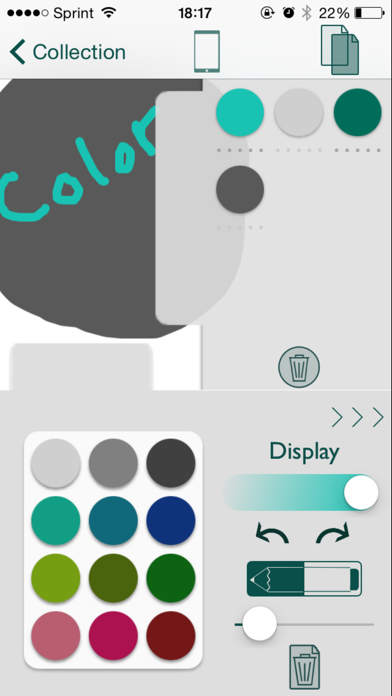
Create and name workspaces for finding color combinations that will look great in your next project. As you draw with colors chosen from a variety of available color pickers, the colors are added to a color palette. Zooming and panning are available in the drawing area to make drawing fine details easier.
There are various color pickers for selecting and discovering colors, but one main display which shows a global color type of your choosing. Whichever color picker used, the main display will always show the current color's value in the desired system.
There are eight main display types for viewing a color's value: HSB Integer, HSB Decimal, RGB Integer, RGB Decimal, RGB Percent, Named HTML, Three-Digit Hex, and Six-Digit Hex.
There are six pickers available for selecting colors.
First is an HSB (hue, saturation, brightness) picker with three sliders.
Then there is an RGB (red, green, blue) picker also with three sliders.
The third picker is Named HTML. It uses RGB sliders to display only the colors that have names in HTML/CSS.
The fourth picker is Three-Digit Hex. It uses RGB sliders to display only colors that can be represented in three-digit hexadecimal form.
The fifth picker is a gradient that can be touched for color selection.
The sixth picker allows the user to bring an image into the app so that a color can be selected specifically from the image.
Alpha can be adjusted for drawing.
Once colors are drawn with, they appear in a side tab. When one of these colors is double-clicked, the color's triads, complementaries, analogous, and split complementaries can be viewed and added to the workspace color set. Also, a set of fixed-brightness, fixed-saturation, pseudo-random-hue colors are generated from this original color, and can be regenerated, as optional colors to add to your workspace.
These workspace colors can be used to replace any of the 12 colors in the fixed color palette in order to allow for a set of personalized colors that can be accessed in any project.
The Duplicate button will make a copy of the current workspace. This enables easy experimentation with colors.
Sharing options include: sharing the drawings and/or sets of colors as images, or sending the set of colors as a Color App file to another user of The Color App. The first of these is useful for sharing, or saving to Photos, a color palette that has been designed or a picture drawn with the selected colors. The second sharing option is perfect for collaborating with others on a project involving choosing and viewing colors and their values.
This app is useful for individuals who design on a computer and need to find color combinations and see each color’s values. It allows the user to pick perfect color palettes, then easily view the colors together, along with each color’s value in a chosen system. This allows for easy input into the computer for iOS development, web design, graphic design, and more.
The app can also be used simply for drawing, with access to a rich set of ways to select colors with which to draw.
Beautifully designed and easy to use, let The Color App become your favorite app for the professional or entertaining use of COLORS.
NOTE: THE LITE VERSION OF THE COLOR APP WILL NOT SAVE ANY DATA. YOUR COLOR PALETTES AND WORKSPACES WILL ONLY BE AVAILABLE DURING THE SESSION YOU ARE USING THE APP.
The full version, however, will save all user data.
There are various color pickers for selecting and discovering colors, but one main display which shows a global color type of your choosing. Whichever color picker used, the main display will always show the current color's value in the desired system.
There are eight main display types for viewing a color's value: HSB Integer, HSB Decimal, RGB Integer, RGB Decimal, RGB Percent, Named HTML, Three-Digit Hex, and Six-Digit Hex.
There are six pickers available for selecting colors.
First is an HSB (hue, saturation, brightness) picker with three sliders.
Then there is an RGB (red, green, blue) picker also with three sliders.
The third picker is Named HTML. It uses RGB sliders to display only the colors that have names in HTML/CSS.
The fourth picker is Three-Digit Hex. It uses RGB sliders to display only colors that can be represented in three-digit hexadecimal form.
The fifth picker is a gradient that can be touched for color selection.
The sixth picker allows the user to bring an image into the app so that a color can be selected specifically from the image.
Alpha can be adjusted for drawing.
Once colors are drawn with, they appear in a side tab. When one of these colors is double-clicked, the color's triads, complementaries, analogous, and split complementaries can be viewed and added to the workspace color set. Also, a set of fixed-brightness, fixed-saturation, pseudo-random-hue colors are generated from this original color, and can be regenerated, as optional colors to add to your workspace.
These workspace colors can be used to replace any of the 12 colors in the fixed color palette in order to allow for a set of personalized colors that can be accessed in any project.
The Duplicate button will make a copy of the current workspace. This enables easy experimentation with colors.
Sharing options include: sharing the drawings and/or sets of colors as images, or sending the set of colors as a Color App file to another user of The Color App. The first of these is useful for sharing, or saving to Photos, a color palette that has been designed or a picture drawn with the selected colors. The second sharing option is perfect for collaborating with others on a project involving choosing and viewing colors and their values.
This app is useful for individuals who design on a computer and need to find color combinations and see each color’s values. It allows the user to pick perfect color palettes, then easily view the colors together, along with each color’s value in a chosen system. This allows for easy input into the computer for iOS development, web design, graphic design, and more.
The app can also be used simply for drawing, with access to a rich set of ways to select colors with which to draw.
Beautifully designed and easy to use, let The Color App become your favorite app for the professional or entertaining use of COLORS.
NOTE: THE LITE VERSION OF THE COLOR APP WILL NOT SAVE ANY DATA. YOUR COLOR PALETTES AND WORKSPACES WILL ONLY BE AVAILABLE DURING THE SESSION YOU ARE USING THE APP.
The full version, however, will save all user data.
Apple AppStore - Google Play
Discussions, Ratings, and Reviews for The Color App Lite - Color Palette Selection Tool App
Leave feedback and review The Color App Lite - Color Palette Selection Tool
Featured Apps
MediaHub
Top News
Stocktracker
Startup Remix
Roblox Robux Calculator
Free Apps (TOP)
Free Apps (NEW)
Paid Apps (TOP)
Paid Apps (NEW)
Top Grossing Apps
Jobsearch Apps
News Apps
Business Apps
Finance Apps
HTML Open Tag Checker
Marketing URL Builder
Percentage Calculator
Inflation Calculator
Loan Interest Calculator
Kids Apps
Dating Apps
Senior Apps
Tradesman Apps
Board Game Apps
Faith Apps
Meditation Apps
AI Apps
EV Apps
Feature Your App
Casting ATL App
The Shop Channel App
Featured: Feature Your App Here
Top Free Apps

TikTok Pro - Events - TikTok Ltd.
1
TikTok Pro - Events is a global discovery platform for videos where you can discover cool, funny, and educational short videos, as well as share important moments with your friends.
Enga...

BigFuture School - The College Board
2
Discover majors, colleges, and careers that might align with your goals and interests. See how the skills you may be developing can lead to future pathways.
BigFuture School is a free mo...

Muse from Meta - Meta Platforms, Inc.
3
Muse is your personal AI agent that gets things done, always working on what matters to you. It manages email, books dinners, tracks budgets, and finds deals, with your approval.
PERSONA...

Vinted: Pre-loved marketplace - Vinted Limited
4
The idea is simple: you sell your pre-loved stuff to other members who’ll love it again. They get the thrill of unboxing a great find, you get more space at home. It's look-good, do-good,...

ChatGPT - OpenAI OpCo, LLC
5
Introducing ChatGPT for iOS: OpenAI’s latest advancements at your fingertips.
This official app is free, syncs your history across devices, and brings you the latest from OpenAI, includi...

Claude by Anthropic - Anthropic PBC
6
Meet Claude, your AI problem solver and thinking partner. Claude works with you to write, research, code, and tackle complex problems and hard questions with depth and precision. It enhan...
Top Paid Apps

Minecraft: Play with Friends! - Mojang
1
Dive into an open world of building, crafting and survival. Gather resources, survive the night, and build whatever you can imagine one block at a time. Explore and craft your way through...

Heads Up! - Warner Bros.
2
It's the game The New York Times called a "Sensation!" and Cosmopolitan raved “Your existence is dull and meaningless without this life-changing app!”
Get ready for endless fun with Head...

Chromagraph Camera - Chromatic Applications LLC
3
Replace your phone camera’s default processing with bespoke, curated color and texture rendering designed by cinematographer Steve Yedlin and used on the Knives Out films.
Chromagraph st...

Shadowrocket - Shadow Launch Technology Limited
4
Rule based proxy utility client for iPhone/iPad.
- Capture all HTTP/HTTPS/TCP traffic from any applications on your device, and redirect to the proxy server.
- Record and display HTTP, H...

Geometry Dash - RobTop Games AB
5
Jump and fly your way through danger in this rhythm-based action platformer!
"Frustratingly wonderful" - Kotaku
"Geometry Dash provides all of the challenge expected from an “impossibl...

HotSchedules - HotSchedules
6
HotSchedules is the industry's leading employee scheduling app because it’s the fastest and easiest way to manage your schedule and communicate with your team.
Team members love it bec...
Top Grossing Apps
ChatGPT - OpenAI OpCo, LLC
1
Introducing ChatGPT for iOS: OpenAI’s latest advancements at your fingertips.
This official app is free, syncs your history across devices, and brings you the latest from OpenAI, includi...

TikTok - Videos, Shop & LIVE - TikTok Ltd.
2
TikTok is the global discovery platform for videos, streaming on LIVE, shopping, and more. Our mission is to inspire creativity and bring joy. Over a billion people come to TikTok to shar...

YouTube - Google
3
Get the official YouTube app on iPhones and iPads. See what the world is watching -- from the hottest music videos to what’s popular in gaming, fashion, beauty, news, learning and more. S...

Snapchat - Snap, Inc.
4
Snapchat is a fast and fun way to share the moment with your friends and family
SNAP
• Snapchat opens right to the Camera — just tap to take a photo, or press and hold for video.
• Expr...

Peacock TV: Stream TV & Movies - Peacock TV LLC
5
Download Peacock, NBCUniversal’s streaming service. Peacock has all your favorite culturedefining entertainment, all in one place.
With Peacock, stream exclusive Originals, fan-favorite m...

Instagram - Instagram, Inc.
6
Little moments lead to big friendships. Share yours on Instagram.
— From Meta
Connect with friends, find other fans, and see what people around you are up to and into. Explore your inte...
New Free Applications


BIGTOPAPPS
 BigTopApps in the AppStore.
 BigTopApps in Google Play.
Contact US for Reviews.
THESHOPCHANNEL APP - Best Shopping Deals, Coupons, and Savings!
Phonetics Trainer on iOS and Android.
Mini Games Studio on iOS and Android.
Casting ATL, FREE on iOS and Google Play Store!
Apple TV MLS Season Pass Apple TV + Apple Music Free 3 Months
New Paid Applications


© 2026 BigTopApps -
Privacy Policy - Troubleshooting Guide - Directory - Contact Us
LiveDataLink Development.
Please note BigTopApps is not responsible for the content provided by the publicly accessible App Store API.
The BigTopApps, BigTopApps.com, and all connected websites, social media platforms, and media outlets are part of a professional website network.
Please note that we may receive compensation from various entities whose products and services we review, promote, and/or endorse.
We are independently owned and the opinions expressed here are our own, except where indicated.